Case Study: How Splital Uses Tolgee MCP to Simplify App Localization
·
...
Barus Urbanova
Customer Success Manager
Summary
Splital, a bootstrapped expense-splitting app, uses Tolgee to manage localization across its mobile app, website, backend-generated files, and native notifications. After two years of using Tolgee, the team recently expanded their workflow with Tolgee MCP and Tolgee CLI, reducing manual importing, tagging, downloading, and string management while scaling from 10 languages to 25+ languages.
From a Travel Problem to a Global Expense App
Splital started as a personal project. Maurizio Faleo and Maria Rojas, Splital co-founders, were traveling when they realized the expense-splitting app they were using no longer worked the way they wanted. So they built their own.
Maurizio says. “We didn’t like the direction they were taking, so we built Splital as a personal project.”
Six weeks later, they had a prototype. Then came the question every builder eventually asks: Could other people use this too?
Today, Splital helps around 15,000 monthly active users split expenses in 100+ countries and is approaching 150,000 downloads across Android and iOS. Users can create a group, add expenses, split them equally or by custom amounts, and let the app calculate who needs to pay whom.
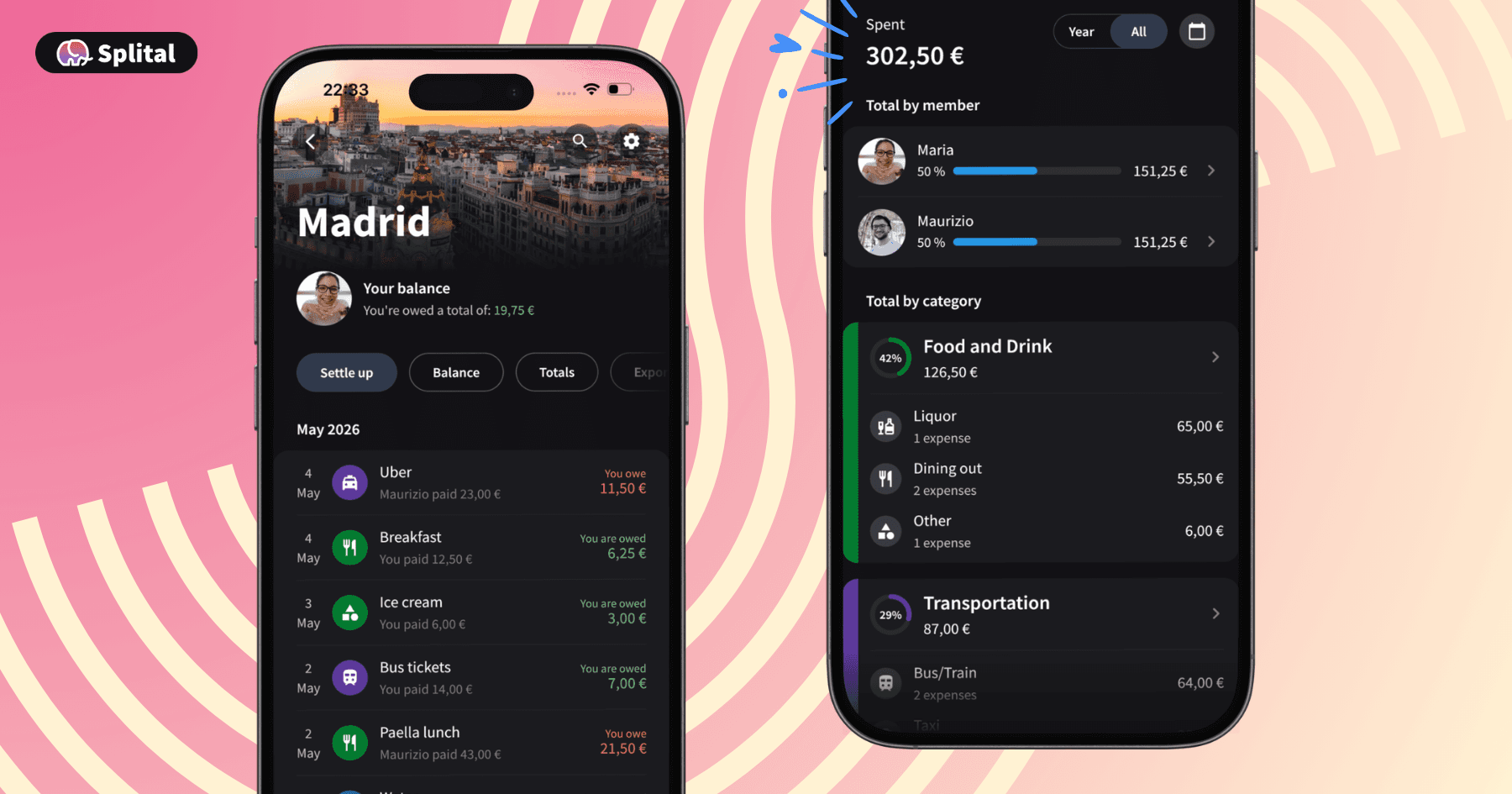
The app can also optimize repayments to reduce the number of transactions, which is especially useful for large travel groups.
“When there are big groups, like 10 people, it’s very useful,” Maurizio explains. “You don’t have to give money exactly to each friend. The app can minimize the number of transactions.”
Why Localization Mattered from the Start
Splital was multilingual from the beginning. The first languages were chosen pragmatically: Italian, Spanish, English, German, French, Portuguese, and a few others the team could review through native speakers or friends.
The reason was simple: the app’s earliest audiences were international from day one. Maurizio is Italian. Maria is from Venezuela. The first users naturally came from Italy and South America, two regions where localized apps matter.
“In Italy, people tend to prefer Italian translations,” Maurizio says. “If an app is in English, they will less likely use it.”
Spanish was equally important. “Maria is a native speaker in Spanish, so we have very high-quality copies there,” he explains. That early localization likely helped Splital gain traction in its strongest markets. Today, South America and Europe make up the majority of usage, with Argentina leading among individual countries.
But as Splital grew, the team started seeing users from more and more regions. “We have users basically in the whole world,” Maurizio says. “More than 100 countries.” That global usage changed how the team thought about localization.
What Splital Would Do Differently: Start with More Languages
After two years of growth, Maurizio looked at Splital’s analytics and noticed something important. The most-used session languages were from the countries Splital already localized. “It’s difficult to believe that’s a coincidence,” he says. That insight pushed the team to expand from 10 supported languages to 25+ languages.
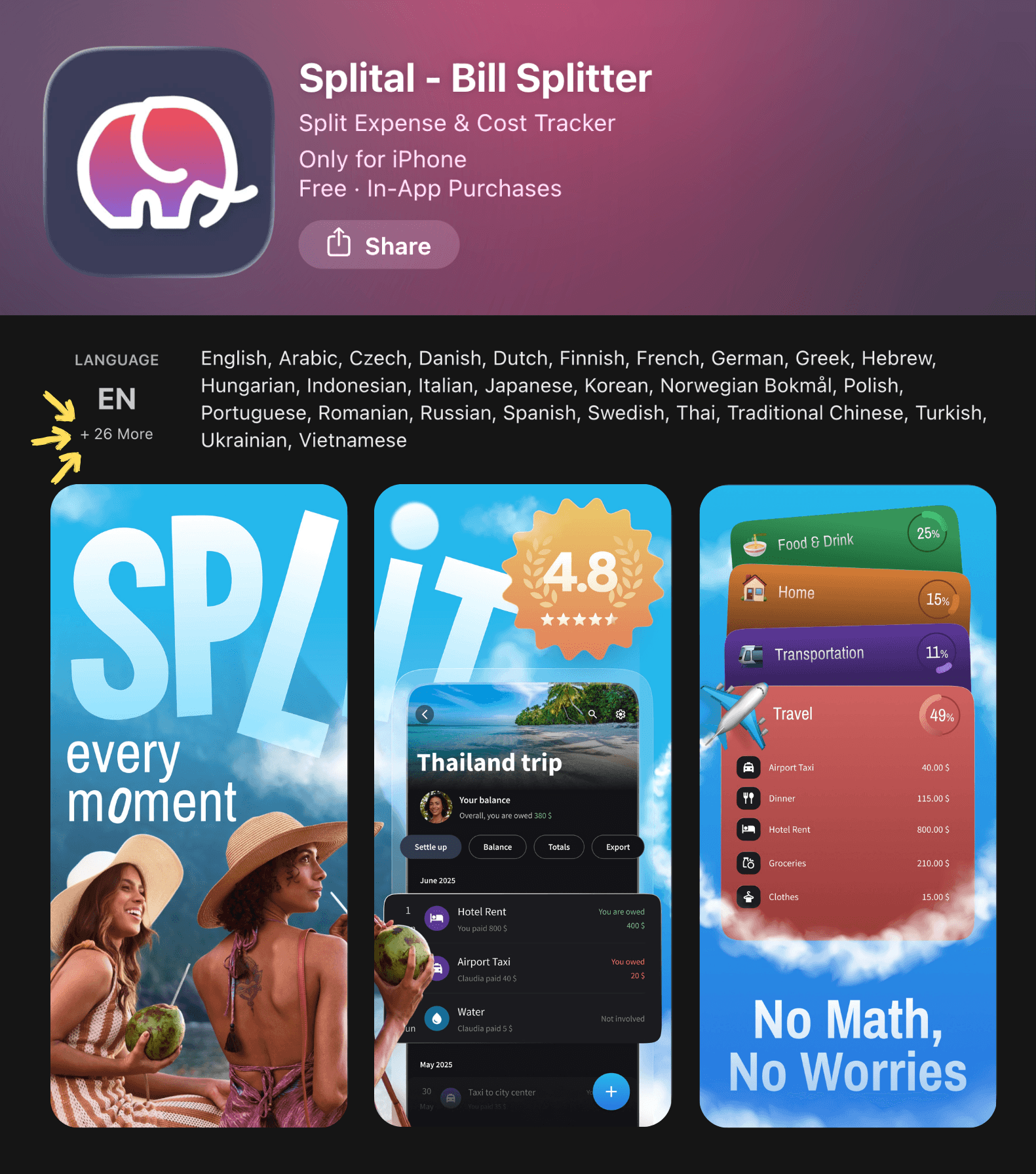
The logic is straightforward: if someone opens a travel app and it is not available in their language, they may not invite friends or family to use it. Especially when traveling with friends or family members who aren't comfortable using apps in English.
“How many users might we lost because their friends couldn’t understand English?” Maurizio says. “For an app for traveling, localization definitely makes sense.”
Localization is now part of Splital’s organic growth strategy. Translated landing pages help users discover the product in their own language, while localized app experiences make it easier for groups to adopt it together.
Why Splital Chose Tolgee
Splital has used Tolgee from the beginning. “We were two people, bootstrapped, with no investors,” Maurizio says. “Tolgee had all the features we needed, very user-friendly, very easy to use.”
“When you’re bootstrapped, you don’t have the same resources as companies with investors,” Maurizio explains. That’s why Tolgee’s free self-hosted version was a perfect fit. “It had all the features we needed while being very user-friendly and easy to use.” For a two-person team, it was more than sufficient. And since both founders are software developers, self-hosting Tolgee was never a barrier.
“It was very easy,” Maurizio says. “I never had breaking changes when updating. Tolgee is very careful in not breaking stuff.”
For Splital, Tolgee became the localization layer across several parts of the product.
Splital’s Localization Architecture
Splital does not use Tolgee for just one app interface. The team manages localization across five Tolgee projects:
Next.js website
Exported as structured i18next JSON.Ktor backend
Used for strings in generated PDF and CSV files that users can download.Shared Compose Multiplatform app
The main mobile app strings used across Android and iOS.iOS native project
Native notification strings exported as Apple .xcstrings.Android native project
Native notification strings exported as Android XML.
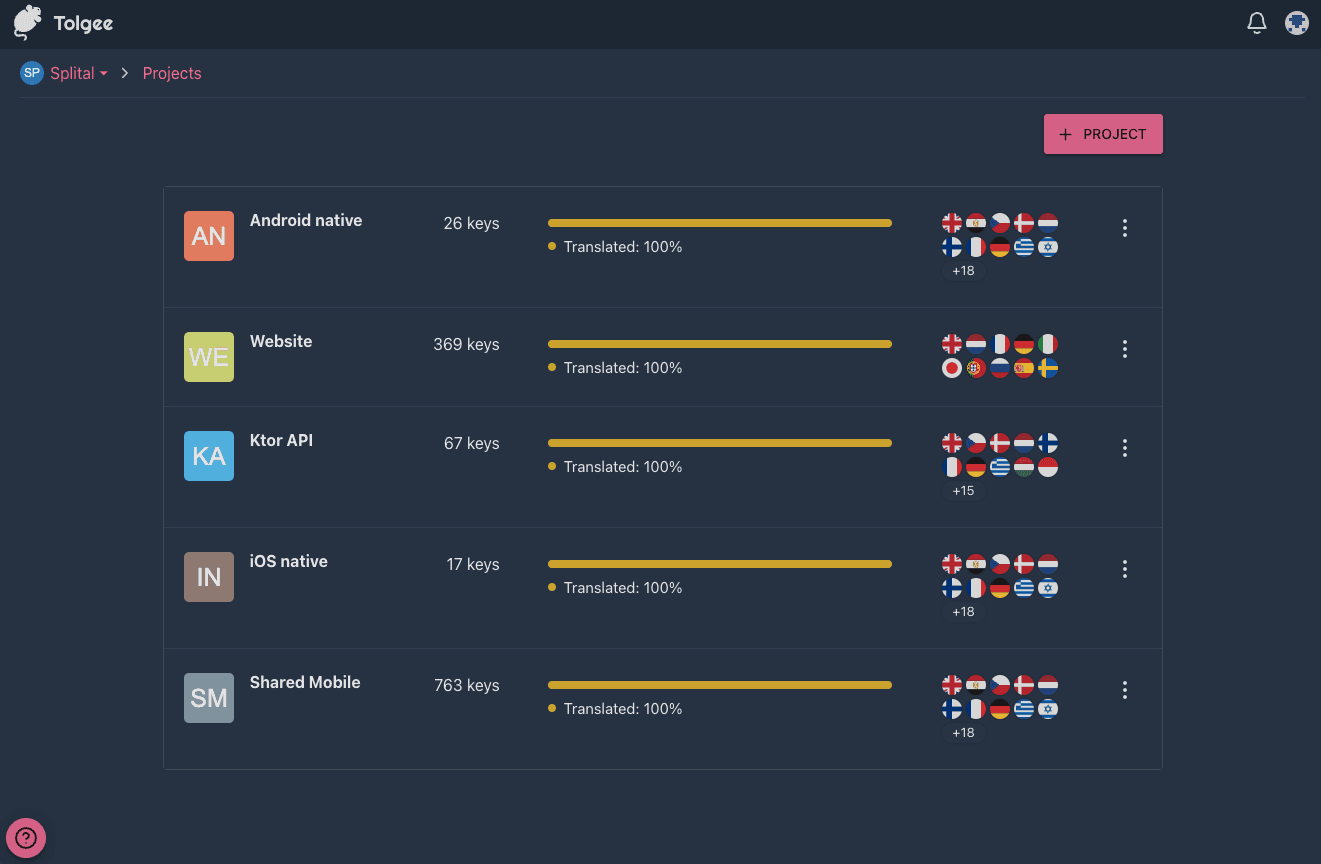
This setup allows Splital to keep translations organized across the full product experience: website, app, backend exports, and mobile notifications.
Before Tolgee MCP: A Workflow That Worked, Until It Didn’t
For a long time, Splital’s localization workflow was simple and manual. It worked well because it required almost no setup.
The team would:
Add new base language strings to Tolgee through the web UI.
Export base language as a JSON.
Ask AI to translate strings into all languages.
Save translations as JSON files, one file per language.
Import those files back into Tolgee through the web UI.
Tag strings manually by screen or feature.
Export language files from Tolgee.
Add language files into the codebase.
With around 10 languages, this was manageable.
But as Splital expanded toward 25+ languages, the workflow became more fragile. Imports started creating conflicts with existing strings, and those conflicts had to be resolved manually in the web UI.
The team also avoided adding detailed string descriptions because it took too much time. That mattered because AI translations are only as good as the context they receive.
The Turning Point: Adding Tolgee MCP and CLI
During a user interview with Tolgee, Maurizio mentioned that he had looked at Tolgee MCP before but had not fully tested it. “I was scared of messing up my Tolgee projects,” he says. After hearing that the Tolgee team also uses MCP internally, he decided to give it a try together with Tolgee CLI.
The timing was perfect: Splital was adding many new languages and modifying existing strings. The workflow changed quickly.
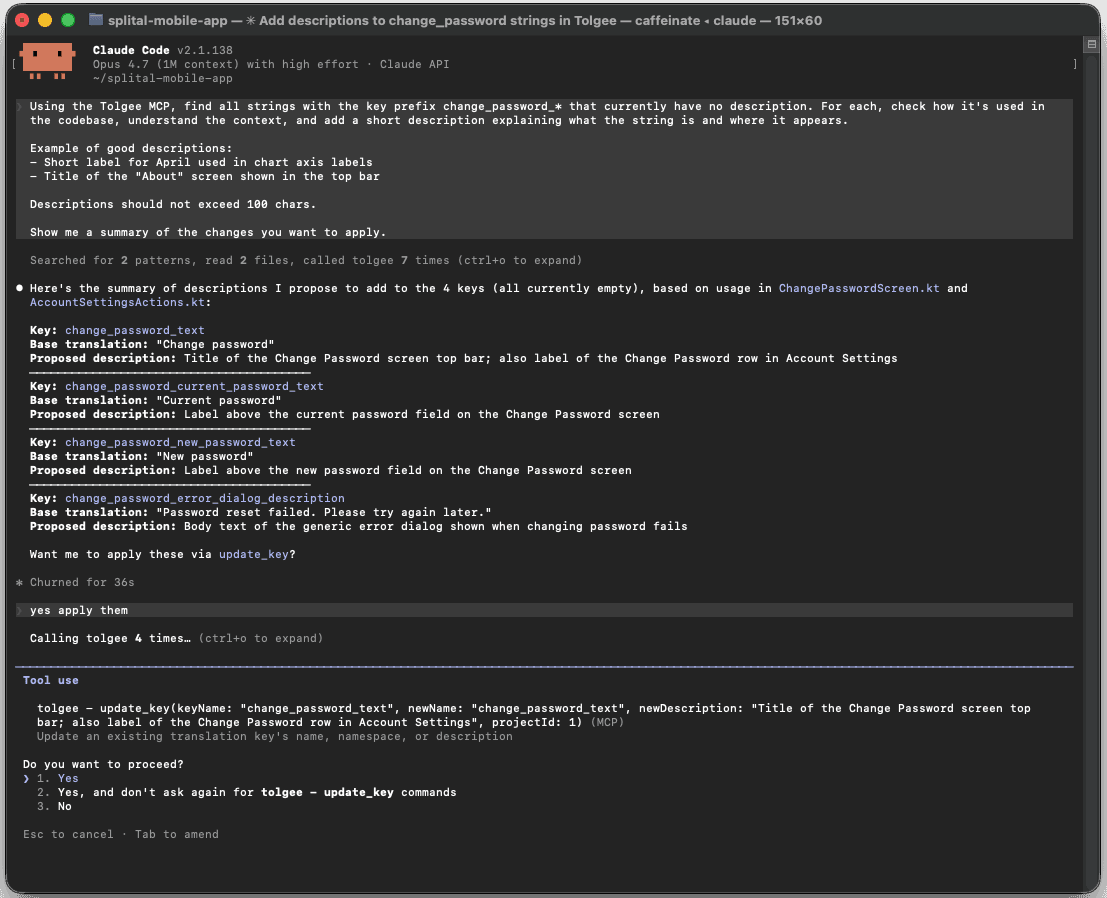
Now Splital asks an AI agent to create and translate strings directly in Tolgee through Tolgee MCP. The agent can also tag the strings and add descriptions explaining how each string is used in the codebase. The team then uses Tolgee CLI to pull translations into the codebase. After that, tests verify the technical correctness of translations before changes are merged.
How Splital Uses Tolgee MCP Today
Splital’s current MCP-powered localization workflow looks like this:
The team asks AI agent to create and translate strings directly in Tolgee using MCP.
The AI agent adds tags such as settings-screen or add-expense-screen.
The agent adds descriptions explaining how each string is used in the app.
Tolgee AI Translator makes the translations.
Tolgee CLI pulls the updated strings back into the codebase.
Unit tests check that translations are technically valid.
The team reviews Git differences before merging.
This removes several manual steps:
No manual tagging,
no manual importing,
no manual downloading,
no repetitive copy-paste,
easier cleanup of unused strings.
“When we have unused strings, we can just ask the MCP to delete them on Tolgee and run the CLI again to pull the changes,” Maurizio explains.
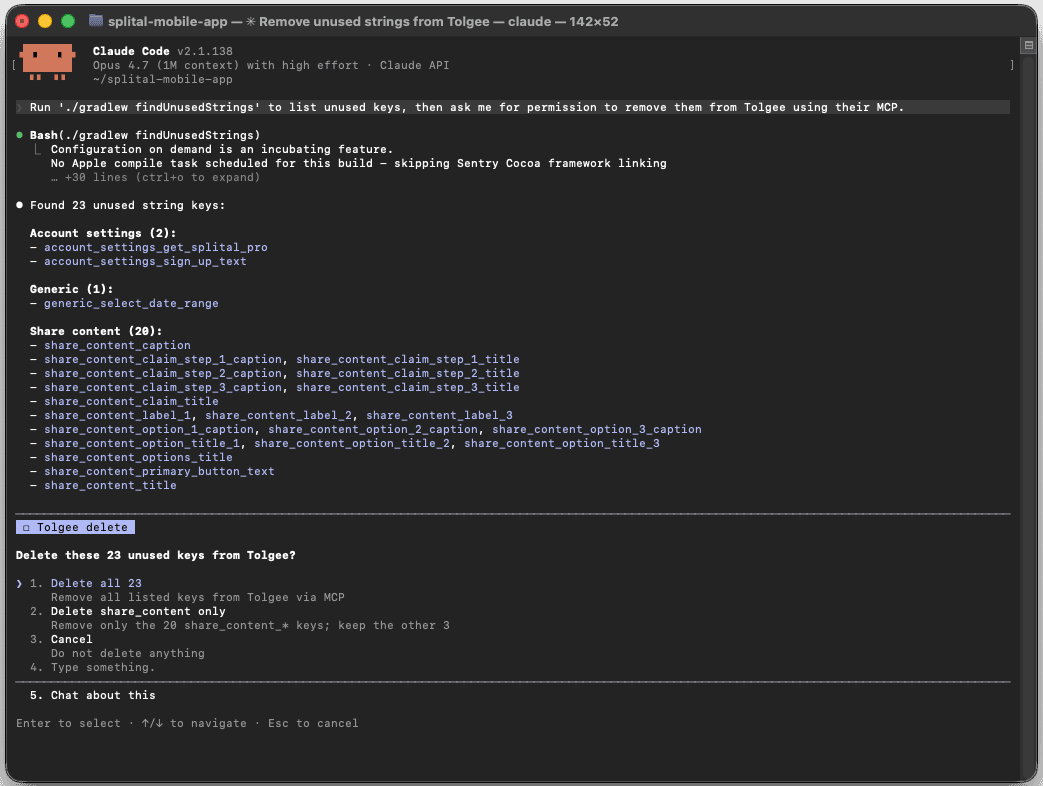
The important part is not just automation. It is that the AI agent can work closer to the product context. “The AI agent has context about the app and how the strings are used,” Maurizio says. That context makes descriptions more useful and translations easier to manage.
Why MCP Matters for Localization Workflows
Tolgee MCP lets AI agents interact with Tolgee directly. For Splital, that means localization can happen in the same workflow where code changes happen.
Instead of writing code, switching to a translation platform, importing files, tagging strings, downloading files, and copying changes back into the codebase, the team can ask an AI agent to handle much of the translation-management work inside Tolgee.
The result is a smoother AI-assisted localization workflow.
Splital still checks everything carefully. The team reviews Git diffs and runs tests to make sure no unexpected changes were made. But the repetitive manual work is significantly reduced.
Keeping AI Translations Consistent Across 25+ Languages
AI translation helped Splital move faster, but it introduced another challenge: consistency. Over the two years, the team noticed that AI translations can vary in style.
For example:
Some strings sound formal, others informal,
unknown user gender may be handled differently,
quotation marks vary by language,
Spanish may be different between Spain and Latin American style,
Portuguese may vary between Brazil and Portugal conventions.
To solve this, Splital created an internal Markdown file with translation rules for each language. Defining tone, quote style, gender handling, and other conventions. The team then translates the strings locally using Claude Code. Tolgee MCP is then used to create and update the translations directly in Tolgee as part of the same workflow.
Today, this can be managed even more easily and directly in Tolgee: instead of maintaining separate files, teams can add language-specific notes as Context data in AI Settings, keeping everything centralized and accessible to the AI during translation.
When Splital finds a translation issue, the team updates the rules so the same mistake is less likely to happen again.
“In this way we noticed a more consistent style in the translations,” Maurizio says.
This turns localization into a learning system: each correction improves the workflow for future translations.
Technical Quality Checks for Translations
As Splital expanded to 25+ languages, manual review alone was not enough. The team added unit tests to check translation sanity before merging changes.
These tests verify that:
All translatable strings are translated,
placeholders are preserved across languages,
characters are escaped correctly when needed,
string files remain technically valid.
This is especially important when AI-generated translations and many languages are involved.
Splital also reviews Git diffs after every MCP workflow to make sure no unwanted changes were made. “It never happened so far,” Maurizio says, but the review step gives the team confidence.
The Hardest Localization Challenge: Right-to-Left Languages
Adding more languages also revealed product-level localization challenges beyond translation. Right-to-left languages like Arabic and Hebrew required layout changes.
“The most challenging ones are the right-to-left layout,” Maurizio says. “Right now I’m fixing all the issues so the app is mirrored exactly as the user expects.”
Numbers were another surprise.
“For instance, the numbers are different,” he explains. “Even the comma is different.”
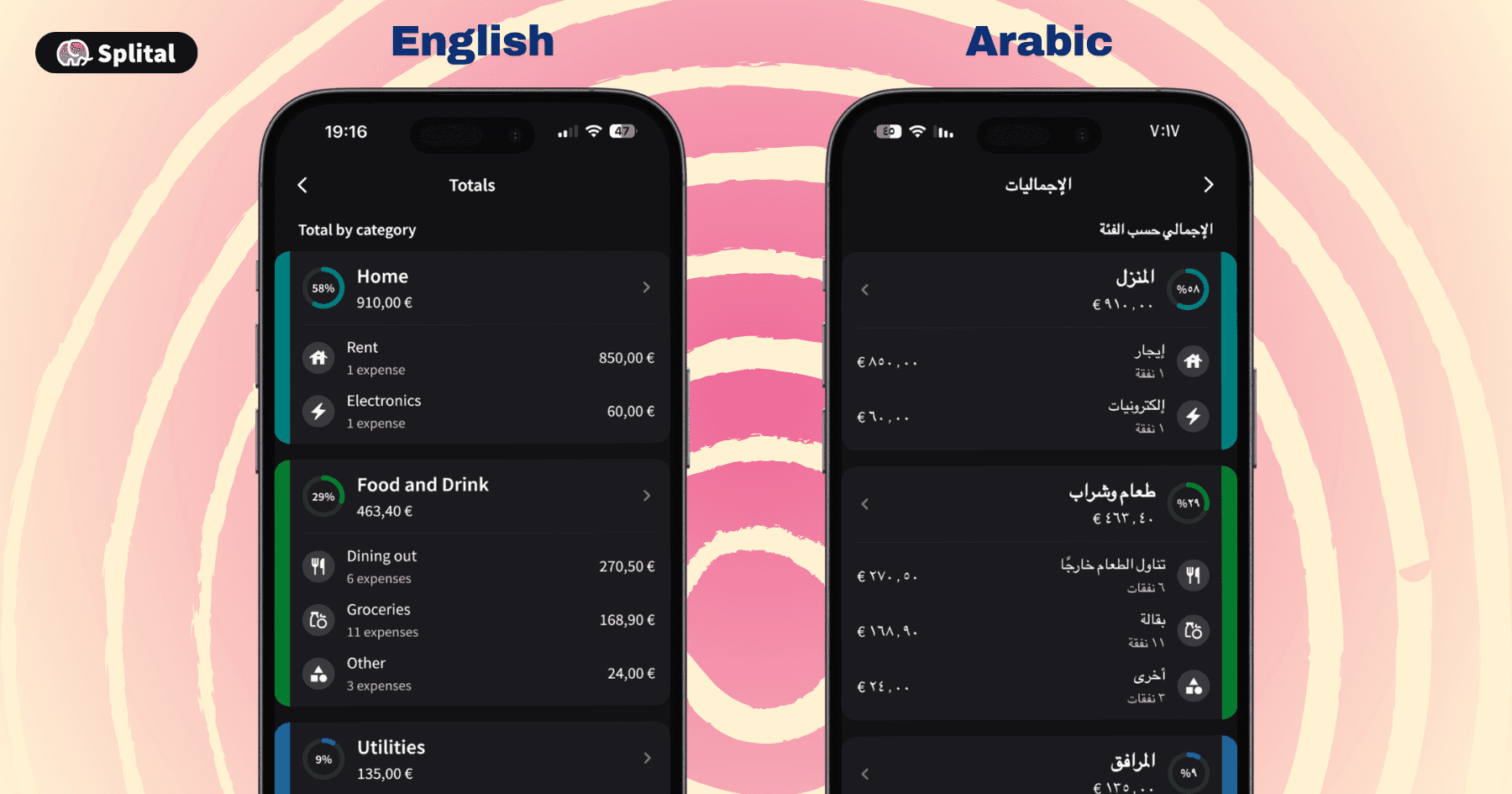
This required the team to remove numbers from some translation strings and let the app insert localized numbers dynamically. For a finance-related app, details like number formatting, decimal separators, and layout direction are not cosmetic. They affect whether users can trust what they see.
What Changed After MCP
The biggest change was friction. Before MCP and CLI, localization involved several manual steps across the Tolgee UI, AI output files, imports, downloads, and the codebase.
Now the AI agent can create, translate, tag, describe, and manage strings directly in Tolgee, while the CLI keeps the codebase in sync. For Splital, this made language expansion manageable.
“With Tolgee, there is no real limit,” Maurizio says. “The friction is very low.”
That does not mean the team can add unlimited languages without thinking. Translation quality, cultural expectations, and layout requirements still matter. But Tolgee MCP and CLI removed enough manual work that supporting 25+ languages became manageable for a two-person bootstrapped team.
What Maurizio Values Most About Tolgee
When asked about his favorite Tolgee feature, Maurizio’s first answer was MCP.
“Right now, it’s the MCP,” he says. “It’s very, very frictionless. It’s very easy to use.”
But after two years, what stands out is also the overall user experience.
“You don’t need a tutorial,” Maurizio says. “You can just open it, explore the interface, and everything is clear.”
He also values the responsiveness of the Tolgee team. At one point, Splital needed an export option for Compose Multiplatform. Maurizio opened an issue on GitHub and Tolgee later implemented it.
“I feel the team cares,” he says. “After a while, I received an update with the feature I was asking for, which is not something you can expect from any company.”
What Other Teams Can Learn from Splital
Splital’s localization workflow shows that even a small bootstrapped team can build a scalable multilingual product when the workflow is structured well.
The key lessons:
Start localization early if your product has global potential.
Use analytics to identify languages users already need.
Keep translation data structured from the beginning.
Use AI, but give it clear style rules and context.
Add automated tests for placeholders, escaping, and missing translations.
Use MCP and CLI to reduce repetitive manual work.
Review changes in Git before merging.
For Splital, localization is not just a feature. It is part of organic growth.
Over to You
If you’re building a multilingual product with a small team, localization shouldn’t become a pile of manual imports, downloads, and copy-paste.
Tolgee helps teams manage translations in one place, connect localization to their codebase, and use AI agents through MCP to reduce repetitive work. While staying in control of quality.
Try Tolgee and see how much easier localization can become!
FAQ
What is Tolgee MCP?
Tolgee MCP allows AI agents to interact with Tolgee directly. Teams can use it to create, update, translate, tag, describe, or delete localization strings through an AI-assisted workflow.
How does Splital use Tolgee MCP?
Splital uses Tolgee MCP to let an AI agent create and translate strings directly in Tolgee, add tags, write descriptions, and manage unused strings. The team then uses Tolgee CLI to pull translations into the codebase.
Why is MCP useful for app localization?
MCP reduces manual localization work. Instead of manually importing, tagging, downloading, and copying translations, teams can let an AI agent handle repetitive localization tasks while keeping humans in control through tests and Git review.
How to keep AI translations consistent?
Use language-specific notes in AI Settings → Context data to define tone, quote style, gender handling, and regional conventions, to help keep AI translations consistent across languages.
Why did Splital choose self-hosted Tolgee?
Splital is a bootstrapped two-person team. Tolgee’s self-hosted option gave them the features they needed without adding unnecessary cost or complexity. Maurizio also found the setup and updates easy to manage.
What parts of Splital are localized with Tolgee?
Splital uses Tolgee for its Next.js website, Ktor backend-generated files, Compose Multiplatform mobile app, iOS native notifications, and Android native notifications.
Key Facts
Company: Splital
Product: Expense-splitting app for travel, home, and group spending
Users: ~15,000 monthly active users.
Downloads: Approaching 150,000 across Android and iOS.
Markets: Users in 100+ countries.
Localization scope: Mobile app, website, backend-generated PDF/CSV files, native mobile notifications.
Languages: Expanding from 10 to 25+
Tolgee setup: Self-hosted Tolgee, Tolgee CLI, Tolgee MCP
Main impact: Less manual localization work, better AI-assisted workflow, more consistent translation style.