Jan Cizmar
Founder & CEO
Tolgee's core platform is built in Spring Boot and TypeScript/React. It's robust, well-tested, and stable because we have integration tests for everything and a single release takes about an hour, so it's not something you iterate on anymore.
That stability is great for our customers. But it's terrible for experimentation. When a customer needs something new, we go through the full release cycle: think about edge cases, test deeply, ship to everyone. Sometimes by the time we ship, the customer already found a workaround. Sometimes the feature doesn't get adopted because we didn't iterate enough with real users before committing to the final design.
We wanted a way to ship experimental features fast. Something we could tailor for a single customer, test with them directly, and tweak based on their feedback without touching the core codebase. We also wanted developers, who are the target audience of Tolgee, to be able to enhance the tool themselves.
That's where Tolgee Apps came from. I vibecoded the whole PoC engine with Claude Code in about 3 man-days of focused work (compared to roughly 20 days without AI) so we could test it at our internal hackathon, where the whole team is now building apps with it. We're not shipping the vibecoded code to production. The next step is to rewrite it properly with full test coverage and proper code review, as we do with everything on the Tolgee platform. The PoC exists to learn fast and make better decisions for the real implementation.
But this article isn't about vibecoding. It's about the architecture decisions I had to make and why I made them.
What Tolgee Apps are
Tolgee Apps are plugins that extend the Tolgee platform through iframes, API access, webhooks, and UI decorators. An app is described by a JSON manifest that declares its metadata, UI modules at named locations, required scopes, webhook subscriptions, and an optional decorators endpoint. Tolgee renders each UI module inside a sandboxed iframe, hands it a scoped context over postMessage, and lets it call the Tolgee REST API with a short-lived JWT token.
In practice, an app can add a new dashboard page to a project, add a panel next to the translation editor, put icons and badges on individual keys, open modals, or react to webhooks when translations change. All without modifying a single line of the core platform.
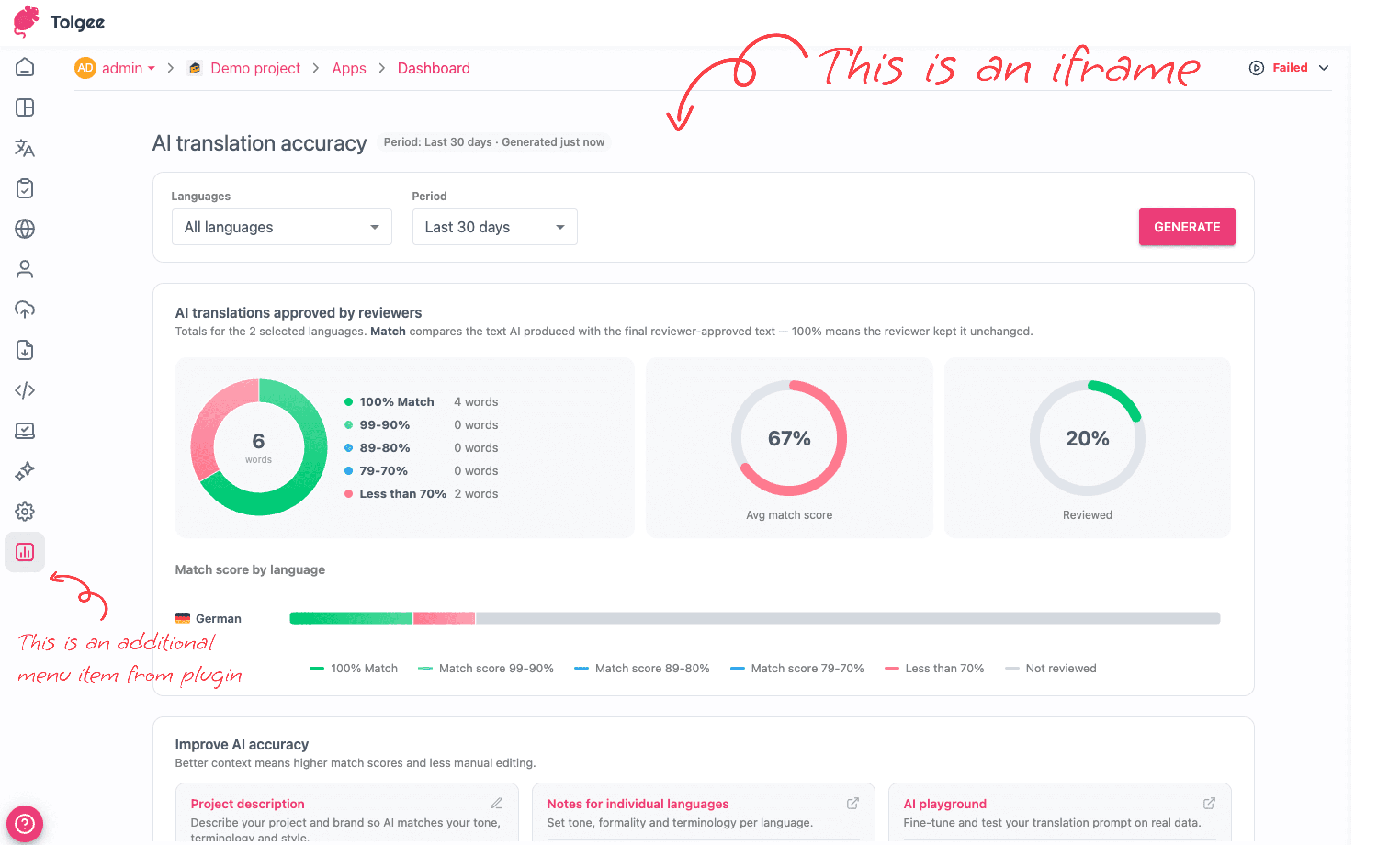
Here's what a real manifest looks like (this is our back-translate example app):
That's the entire app descriptor. It tells Tolgee: "I need translations.view and keys.view permissions, notify me on SET_TRANSLATIONS webhooks, render my /tools-panel route in the translation tools panel, and show a dynamic warning icon on translations where my decorators endpoint says there's a problem."
The embedded iframe app model
This pattern has a name in the industry: the "embedded iframe app" model. The common ingredients are a JSON manifest declaring modules and scopes, sandboxed iframes rendered by the host at named locations, a postMessage bridge for context and handshake, a scoped OAuth/JWT token whose access never exceeds the installing user, and signed webhooks for server-side events.
We're not the first to use it. Atlassian Connect is probably the archetype, and you'll find the same pattern in Contentful App Framework, Shopify embedded apps, Zendesk Apps Framework, Salesforce Canvas, monday.com, and Miro. In the localization space, Crowdin Apps is our direct peer with almost the same model, while Lokalise, Phrase, and Smartling lean more on API integrations than in-product iframe plugins.
There are also sandboxed-JS and serverless approaches (Atlassian Forge, Shopify Functions, HubSpot UI extensions), but we deliberately picked the iframe route because it works best for our case. It's language-agnostic, lets app authors deploy anywhere, and with our tunnel + hot manifest-URL developer experience, it's trivial to develop locally.
Three decisions that shaped everything
When I started designing Tolgee Apps, there were three fundamental architecture decisions to make. Each one avoids a major rabbit hole, and each one comes with real tradeoffs. When I was thinking about the plugin system I was scared about the consequences, but these three decisions made the whole thing almost riskless and relatively easy to reason about.
Decision 1: No storage on the Tolgee platform side
Tolgee doesn't store any plugin data in its database. If a plugin needs to persist state (like the back-translate verdicts or glossary suggestions in our example apps), the plugin author hosts that storage themselves. They can pair their stored data with Tolgee's translation IDs, key IDs, and project IDs, but the data lives in their own backend.
I'm still considering adding some kind of per-key or per-translation store in JSONB format, where you could index certain parts based on a data structure declared in the manifest. But as soon as I start thinking about it, the rabbit holes appear: how to properly handle data structure migrations, how to limit plugins from storing too much data, how to enable search across plugin data, how to handle cleanup when a plugin is uninstalled. It's a lot of unsolved questions.
The big disadvantage of keeping storage external is that we don't control the data and we don't have it. We also can't control versioning. If the author of a plugin stops providing the backend, the app just stops working and we can't even keep an old version running. But these are the same challenges that GitHub Apps, Slack Apps, and every cloud app platform faces. I haven't seen many systems where the platform company actually manages the plugin backends and runtimes, because the complexity is enormous.
Decision 2: No plugin code running on the Tolgee runtime
Before Tolgee, I worked at NetSuite. They have SuiteScript, which runs plugin code both on the frontend and backend. It's powerful because system integrators can customize everything without caring about hosting. But it's also brutal. They have a huge team working just on isolating the plugin runtime, managing the limited API surface, and handling the security issues that come with running arbitrary code on your servers. You need proper sandboxing, resource limits, execution timeouts, and a whole separate security review process.
We don't have the team or the budget for that. So we made the developers host it themselves. The tradeoff is clear: app authors need their own backend (even if it's a free Heroku instance or a serverless function), and we can't guarantee the app will stay available. But it also means we don't have to worry about compute costs, memory limits, or isolating untrusted code in our runtime.
For our own first-party apps, we'll probably use a shared database system where all the Tolgee-built apps share infrastructure. But that's a deployment decision for our own apps, not a constraint we impose on third-party developers.
Decision 3: No code execution in the UI (iframes only)
Figma plugins run in a sandboxed JS VM inside the app. That makes sense for Figma because design plugins need to execute fast and interact deeply with the document model. We even rewrote our own Figma plugin from React to Svelte just for performance, so I understand why they chose that approach.
But for Tolgee, the XSS risk of running third-party JavaScript in our UI runtime is not worth it. If we ran plugin code in the same JavaScript context as the Tolgee app, a plugin could modify prototypes, intercept network requests, or access the DOM of the main application. There's a whole category of attacks that become possible when you share a JS runtime with untrusted code. Shadow DOM and web components don't fully isolate the JavaScript execution context, so they don't solve this either. Microfrontends with module federation would run in the same runtime too, which means the same XSS surface.
Iframes provide true origin isolation. The plugin's JavaScript runs in a completely separate browsing context. It can't touch the parent frame's DOM, can't modify prototypes, can't intercept anything. Communication happens exclusively through postMessage, which is a narrow, controllable channel.
The tradeoff is that iframes are slower than native JS, they have sizing quirks, and cross-origin communication adds latency. But during our hackathon, none of these turned out to be real problems for the translation management use case. We're not building a design tool where milliseconds matter. We're showing panels, badges, and dialogs.
How the token flow works
The auth model is one of the parts I think is genuinely interesting, so let me walk through it.
When Tolgee renders a plugin's iframe, the webapp calls POST /v2/projects/{projectId}/apps/{installId}/token to mint a short-lived JWT. This token uses a dedicated audience (tg.app) and carries only identity claims: the install ID, project ID, and the current user's ID. No scopes are baked into the token.
The handshake sequence looks like this:
When the iframe makes an API call with this token, the auth filter on every request resolves the install entity, the user account, and the per-project enablement from the database in real time. It checks that the install still exists, that it's enabled for this project, and that the user's tokensValidNotBefore timestamp hasn't invalidated the token.
The effective permissions are computed as the intersection of the app's granted scopes and the current user's project permissions. So if an app has translations.edit but the current user only has translations.view for this project, the API call gets translations.view only. The app could use its own app token to bypass this, but with user tokens we handle the permissions for the app author, so the app never exceeds what that particular user could do natively in Tolgee.
This means revocation is instant and doesn't require a token blocklist. Remove the install, and every outstanding token returns 401 on the next request. Disable the app for a project, same thing. Bump the user's token validity timestamp, same thing. The token is just an identity reference, not a capability bearer, so there's nothing to revoke. The source of truth is always the database (or cache).
For server-side operations (webhooks, background tasks), the app uses its clientSecret (prefixed tgapps_) instead of the user JWT. In this case the effective permissions are just the app's granted scopes without user intersection, because there's no user context. The app can also "act as" a specific user by passing the user context, in which case the intersection applies again.
The decorator pattern
This is probably the most interesting UI extension mechanism, so it deserves its own section.
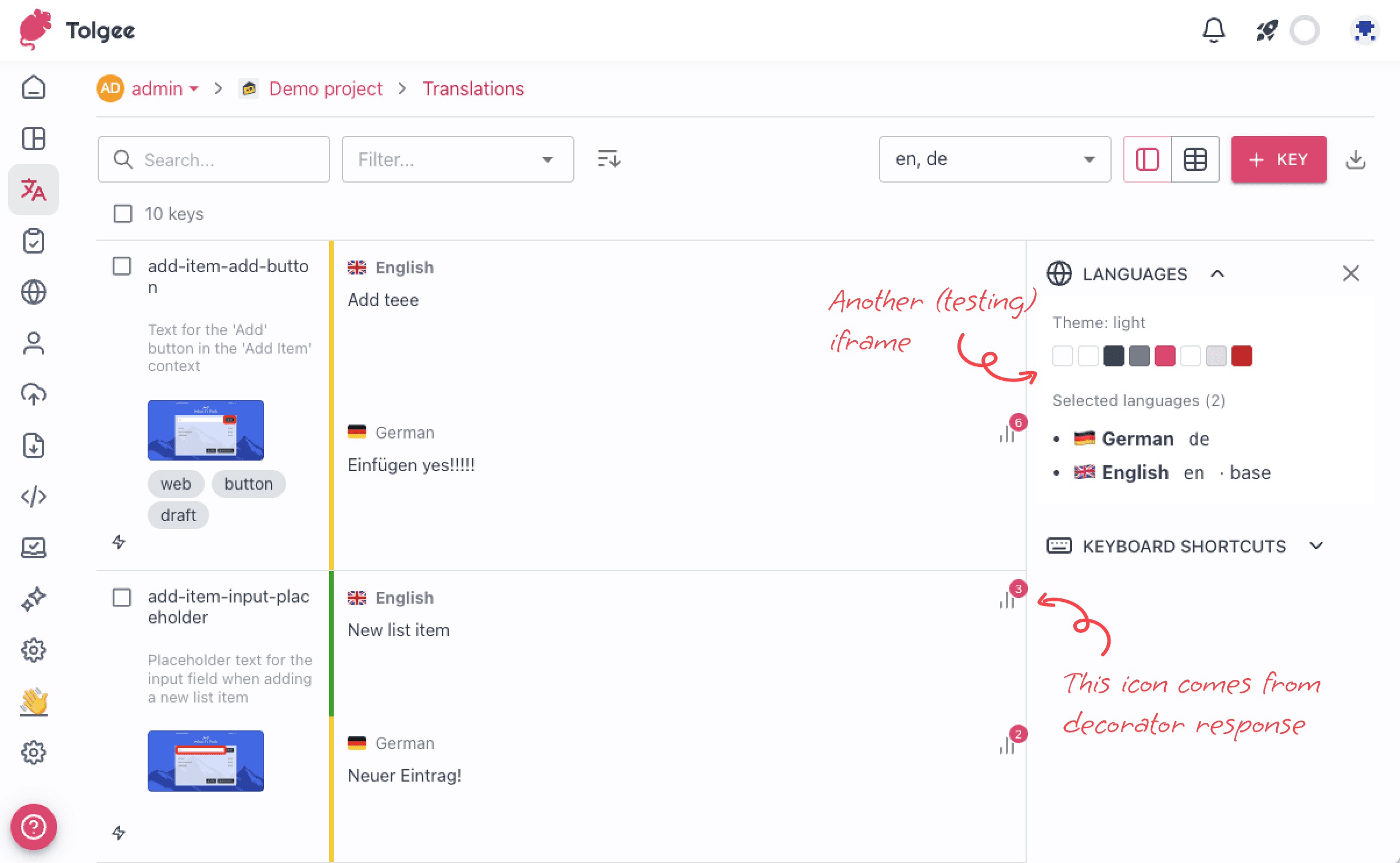
In the Tolgee translations view, you see a paginated list of keys with their translations. When a plugin wants to annotate these keys (show an icon, a badge with a count, a warning indicator), we need a way to compute that information for the visible keys without the plugin holding all state in the browser.
Here's how it works. The app's manifest declares a decoratorsUrl endpoint. When the translations view loads a page (say, 60 keys), Tolgee POSTs the visible key IDs and language tags to that endpoint:
Tolgee reads the response and renders the matching icons on each row. The action tied to each icon can open a side panel, switch to a key-edit tab, open a modal dialog, or navigate to an external URL. So a single icon click on a translation row can open a rich plugin interface.
For example, imagine a game localization plugin that manages voiceover recordings. For each translation, the decorator could show a microphone icon with a badge showing how many recordings exist. Clicking it opens a panel where the translator can record or review the voiceover. The decorator endpoint checks the plugin's own database for recording status and returns the right metadata for each visible key. All without Tolgee storing any voiceover data.
The decorators can also be dynamic, meaning their visibility depends on the current state. If a back-translation check found a mismatch, the decorator shows a warning icon. If everything matches, no icon. The plugin decides per key, per request.
The vibecoding experience
I won't go deep into the AI story here since this article is about the architecture. But a few things are worth mentioning.
The whole PoC took about 4 weeks, built with Claude Code. My role was architecture and direction. Claude implemented everything. On the first day alone I shipped iframe rendering, scope and consent flow, end-to-end token flow, and the postMessage handshake.
Some of the best ideas came from the developer experience side. The Cloudflare tunnel that automatically makes your local plugin reachable from a public Tolgee instance was Claude's idea. The npm run register flow that opens a browser, gets consent, and saves credentials without manual URL pasting was also well done. The generated apps ship with a CLAUDE.md and a pull-context script so that AI assistants can code against the current SDK, which makes the whole develop-with-AI loop work.
Where the AI failed was predictable: security shortcuts. At one point it started using a personal access token (TOLGEE_PAT) directly in the app code instead of going through the proper per-organization auth flow. I caught it because the environment variable felt useless, dug into the code, and removed it. This is a pattern I see consistently: the AI goes for the fastest working solution and forgets about proper auth boundaries.
What's next
Tolgee Apps are in PoC stage, with a draft PR on the Tolgee platform repo. In about 2 months I'd like to release a working production version.
The next step is to split the work into smaller chunks and start implementing from scratch, commit by commit, carefully reviewing everything to make sure the security and code quality are solid. It's super easy to get the code bloated by AI when you don't carefully manage it.
The hackathon is happening right now. The next article will cover what we built, what broke, and what we learned for the production rewrite.