Giving Your Clients the Power to Edit Their Own Translations (Tolgee for Software Agencies)
·
...

Jan Cizmar
Founder & CEO
If you've ever built an app for a client, you might know this scenario. You ship the product. A few days later, the client writes: "Can we change the button from 'Get Started' to 'Start Free Trial'?"
It's a tiny change. But it becomes a ticket. A developer has to find the right translation key, update the string, push the code, deploy. Maybe it goes through a PR review. Maybe it waits until the next sprint.
Even if you use AI coding agents, someone still has to prompt it, review the change, and deploy. For a one-word change.
If this hasn't happened to you, lucky you. But if it has, and especially if it keeps happening across multiple clients and languages, you know how these small requests add up.
Sounds familiar? The usual ways to deal with it
Different teams handle this differently. Maybe you've tried some of these:
"Just send us a ticket." Simple and works at first. But over time, ticket volume grows. Clients feel like they're bothering you with small stuff. Developers feel like they're wasting time on non-development work.
"Here, use this spreadsheet." Some teams export translations into a shared Google Sheet or CSV file. The client edits there, the developer imports the changes back. In practice, this tends to become a sync nightmare. Someone edits the wrong cell. Keys get mismatched. Nobody knows which version is current.
"Let's use a Translation Management System." This is probably the right direction. A TMS gives you a proper workflow: keys, languages, review process, version history. But even here, there's a catch.
The TMS catch: access without context
Say you give your client access to a TMS. They log in and see a list of translation keys with their values. Sure, they can see the base string (like "Save" or "Cancel"). But the problem is: that same word "Save" might appear in five different places in the app. Which one are they editing?
They don't know where in the app a specific string is used. They change what they think is the checkout button, but it turns out it was the settings page button. Or worse, it was a shared key used everywhere.
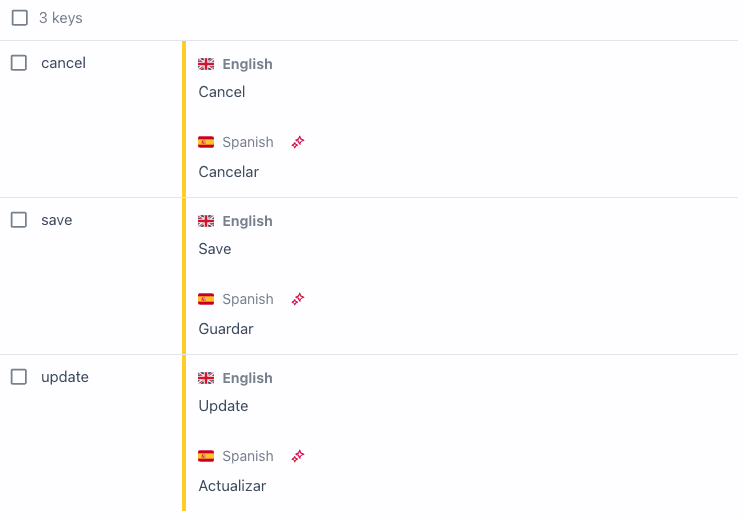
Your client doesn't think in translation keys. They think in what they see on screen. They point at a button and say "change that one."
So what happens? They message the developer anyway. "Which key is the button on the checkout page?" The developer looks it up, tells them, the client makes the change. You've technically given them self-service, but you're still involved in every change.
You've added a tool, but you haven't actually removed yourself from the loop.
What clients actually need: edit what you see
The solution is surprisingly simple in concept. Instead of asking clients to navigate a list of keys, let them edit text directly in the running application.
They open the app. They see the button they want to change. They click on it. They type the new text. Done.
No keys. No guessing. No tickets. No developer in the middle.
This is what in-context editing means. The client works in the environment they understand: the actual product. They can see exactly what they're changing and how it looks right away.
How this works in practice with Tolgee
Tolgee is a translation management platform that includes in-context editing as a core feature. Here's how it works:
Development mode: in-context editing for your team
During development, you integrate Tolgee's SDK into your frontend app. Tolgee has native integrations for React, Vue, Angular, Svelte, and vanilla JS. It also works with existing i18next setups.
In development mode, you provide an apiUrl and apiKey in your Tolgee configuration, and include the DevTools plugin. This enables in-context translation locally: hold Alt/Option, hover over any text, and click to edit it directly. Changes are saved to the Tolgee platform instantly.
The DevTools are automatically excluded from production builds (based on NODE_ENV), so there's no risk of accidentally shipping them.
Production mode: in-context editing for clients
For production, translations are served as static data. You can either bundle JSON files exported via the Tolgee CLI (tolgee pull ./i18n) or fetch them from Tolgee Content Delivery at runtime.
When clients need to edit, they use the Tolgee Tools Chrome extension. They open the production app, activate the extension with their credentials, and the in-context editing mode turns on. They click on any text, edit it, save. No code changes, no deployments needed.
This way, the production app stays lightweight and fast for end users. But authorized clients can still edit texts when they need to.
For multiple languages
If the app supports multiple languages, the client (or their translator) can switch languages and edit translations in context. They always see how the text fits in the actual UI. No more truncated buttons or overflowing labels discovered after deployment.
For review
Every change goes through the workflow you define. You can set it up so client changes go live immediately, or require developer approval first. Whatever fits your relationship with that client.
What else changes
Beyond the time savings, there are a few less obvious improvements you might notice:
Fewer "it looks wrong" bugs. When clients edit text in context, they immediately see if their new copy is too long for a button or breaks the layout. They self-correct before it ever becomes an issue.
Better client relationships. Clients feel empowered. They don't feel like they're bothering you with "small" requests. The friction disappears, and the relationship stays focused on real development work.
Smoother handoffs. When a project moves from active development to maintenance, text management is already handled. The client doesn't need ongoing developer support for content changes.
Faster multilingual launches. When clients expand to new markets, they can onboard translators who work directly in context. Translators see the actual UI, understand the context, and produce better translations on the first pass. Tolgee also automatically collects context about key relationships on the page, which improves AI translation quality.
The AI-first translation workflow
If you're dealing with multiple languages, there's another piece worth mentioning: AI-powered initial translations.
When you add a new language, Tolgee can generate translations automatically using AI. The SDK collects context about how keys relate to each other on the page, which helps the AI produce more accurate translations. For most strings, it gets it right. But short strings, ambiguous terms, and context-dependent phrases sometimes need human review.
This creates a natural workflow:
AI translates everything (fast, gets you 80-90% there)
Client or translator reviews in context (catches the remaining issues)
Changes go live without developer involvement
If you're managing multiple multilingual projects, this can save you a lot of time.
Is this for you?
In-context editing probably makes sense if:
Your client actively manages their own copy and marketing text
The app supports (or will support) multiple languages
You want to reduce ongoing maintenance tickets after project delivery
Your client's team includes non-technical people who need to make text changes
It's probably not worth the effort if:
The app has very few user-facing strings
Text never changes after launch
The product is heavy on user-generated or AI-generated content, where UI string localization is a small part of the overall content challenge
Getting started
If you want to try this, here's what the setup looks like:
Integrate the SDK. Replace your existing i18n calls with Tolgee's SDK. If you're already using a standard i18n library like i18next or react-intl, the migration is straightforward. An AI coding assistant like Claude can handle this in minutes. See the integration docs for your framework.
Import your existing translations. Use the Tolgee CLI to push your current translation files to the platform.
Set up production delivery. Configure Content Delivery or bundle exported JSON files with your app.
Give your client access. Set up their permissions in the Tolgee platform.
A 5-minute demo. Show them how to install the Tolgee Tools Chrome extension, activate it, click on text, and edit. That's usually all it takes.
From that point on, text changes flow through Tolgee instead of through your ticket system.
The bottom line
The best tool you can give a client is one they can actually use without calling you. For text and translation management, that means meeting them where they are: in the actual app, looking at the actual UI, clicking on the actual text they want to change.
It's a small shift in workflow. But it removes a disproportionate amount of friction from the agency-client relationship. And it frees up developer time for work that actually needs a developer.
Tolgee is an open-source translation management platform with in-context editing, AI translations, and developer-friendly integrations. Available as SaaS or self-hosted via Docker. Get started for free.